Oct - Dec 2025
Phishing Scams – What to Watch For
Phishing scams may be sent by email, text message, phone call, or social media, and often pretend to be from trusted organisations. eg: PayPal, NZPost, ATO, TOLL
What Scammers Want You to Do
If you click the link, they may ask for:
Usernames and passwords
Card or bank details
Onetime passwords (OTPs)
If you call the number, they may:
Pretend to fix an issue or dispute transactions for you
Ask for security codes
Try to access your device
Guide you into making payments
See the examples below of common phishing scams:
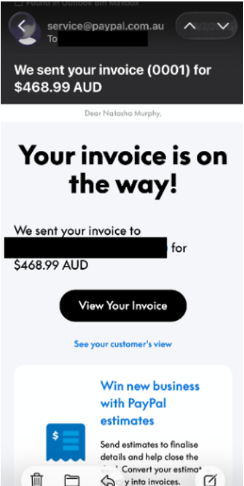
Fake invoice:A message claiming an invoice has been issued (often using names like Bitcoin) and asking you to click a link or call a number.
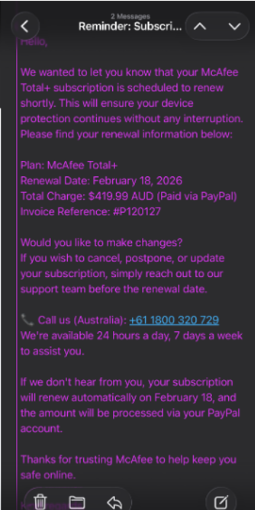
Fake subscription renewal: A message saying a subscription has been renewed or will be charged, urging you to call to dispute it.
How to Protect Yourself
Avoid clicking links in unexpected messages
Check and contact via phone numbers against the organisation’s official website
Only enter personal details on official websites or apps
Never share OTPs, passwords or security codes